2. Data Management
This chapter describes all technical aspects related to data within the SOSPilot project. The “data” as mentioned here applied initially to LML RIVM data, i.e. Dutch Air Quality Data. In 2015 this setup was also used to handle air quality data from the Smart Emission (Nijmegen) project. This is described in a separate chapter: Smart Emission Project.
- obtaining raw source data: observations&measurements (O&M), metadata (stations etc).
- data transformation (ETL) to target various (OWS) services, INSPIRE, E-reporting and custom services
- tooling (databases and ETL-tools) for the above
Source code for data management and ETL can be found in GitHub: https://github.com/Geonovum/sospilot/tree/master/src
2.1. Architecture
Figure 1 sketches the overall SOSPilot architecture with emphasis on the flow of data (arrows). Circles depict harvesting/ETL processes. Server-instances are in rectangles. Datastores are shown with “DB”-icons.
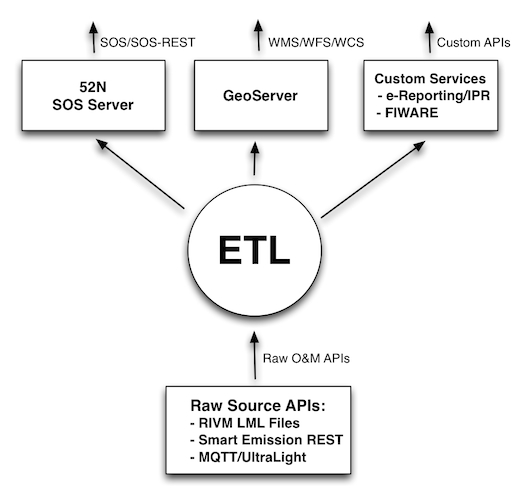
Figure 1 - Overall Architecture
The main challenge/flow of data is from Raw Source APIs such as raw XML files with Air Quality data provided by the RIVM LML server. In a later stage of the project this architecture was reused for other raw O&M sources such as the CityGIS Sensor REST API in the Smart Emission project (see Smart Emission Project).
The RIVM LML file server provides a directory of XML files with hourly measurements of the past month. The big circle “ETL” embeds the data transformation processes and storage that is required to deliver OGC services for WMS, WFS (via GeoServer) and SOS (via the 52 North SOS Server) and other Custom Services at a later stage (dashed rectangle) such as EU IPR-compliant E-reporting.
2.2. ETL Design
In this section the ETL as used for RIVM LML data is elaborated in more detail as depicted in the figure below.
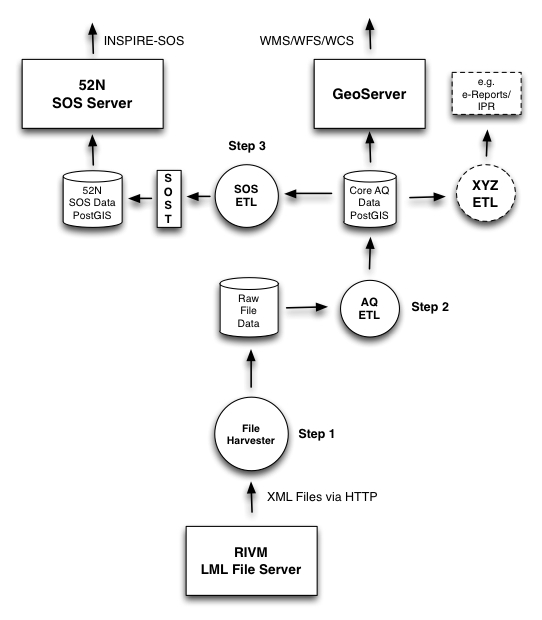
Figure 2 - Overall Architecture with ETL Steps
The ETL design comprises three main processing steps and three datastores. The three ETL Steps are:
- File Harvester: fetch source data from RIVM e.g. from http://lml.rivm.nl/xml and store locally
- AQ ETL: transform this local source data to intermediate “Core AQ Data” in PostGIS
- SOS ETL: transform and publish “Core AQ Data” to the 52N SOS DB via SOS-Transactions (SOS-T)
The detailed dataflow from source to destination is as follows:
- The File Harvester fetches XML files with AQ/LML measurements from the RIVM server
- The File Harvester puts these files as XML blobs 1-1 in a Postgres/PostGIS database
- The AQ ETL process reads these file blobs and transforms these to the Core AQ DB (Raw Measurements)
- The Core AQ DB contains measurements + stations in regular tables 1-1 with original data, including a Time column
- The Core AQ DB can be used for OWS (WMS/WFS) services via GeoServer (possibly using VIEW by Measurements/Stations JOIN)
- The SOS ETL process transforms core AQ data to SOS Observations and publishes Observations using SOS-T InsertObservation
- These three processes run continuously (via cron)
- Each process always knows its progress and where it needs to resume, even after it has been stopped (by storing a progress/checkpoint info)
These last two ETL processes manage their last sync-time using a separate progress table within the database.
The first (Harvester) only needs to check if a particular XML file (as they have a unique file name) has already been stored.
Advantages of this approach:
- backups of source data possible
- incrementally build up of history past the last month
- in case of (design) errors we can always reset the ‘progress timestamp(s)’ and restart anew
- simpler ETL scripts than “all-in-one”, e.g. from “Core AQ DB” to “52N SOS DB” may even be in plain SQL
- migration with changed in 52N SOS DB schema simpler
- prepared for op IPR/INSPIRE ETL (source is Core OM DB)
- OWS server (WMS/WFS evt WCS) can directly use op Core OM DB (possibly via Measurements/Stations JOIN VIEW evt, see below)
The Open Source ETL tool Stetl, Streaming ETL , is used for most of the transformation steps. Stetl provides standard modules for building an ETL Chain via a configuration file. This ETL Chain is a linkage of Input, Filter and Output modules. Each module is a Python class derived from Stetl base classes. In addition a developer may add custom modules where standard Stetl modules are not available or to specialize processing aspects.
Stetl has been used sucessfully to publish BAG (Dutch Addresses and Buildings) to INSPIRE Addresses via
XSLT and WFS-T (to the deegree WFS server) but also for transformation of Dutch topography (Top10NL and BGT)
to PostGIS. As Stetl is written in Python it is well-integrated with standard ETL and Geo-tools like GDAl/OGR, XSLT and
PostGIS.
At runtime Stetl (via the stetl command) basically reads the config file,
creates all modules and links their inputs and outputs. This also makes for an easy programming model
as one only needs to concentrate on a single ETL step.
2.2.1. ETL Step 1. - Harvester
The RIVM data server provides measurements of the past month in a collection of XML files served by an Apache HTTP server. See figure below.
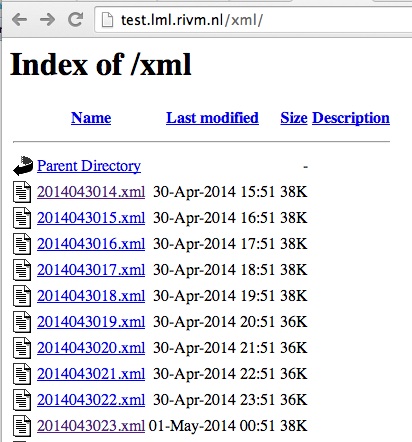
Figure - Apache Server Raw File Listing
The LML Harvester will continuously read these XML files and store
these in the DB as XML Blobs with their filename in the Postgres
table lml_files.
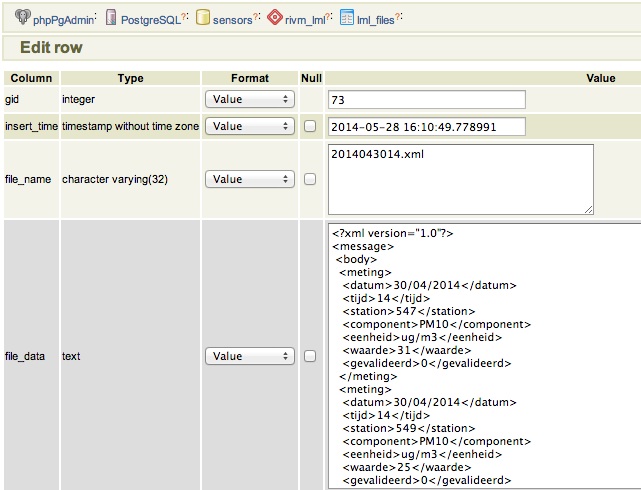
Figure - Raw File Record Harvested into DB
This can be effected by a simple Stetl process activated every 30 mins via the linux
cron service. Stetl has a built-in module for Apache dir listing reading.
Only a derived version needed to be developed in order to track which files have been
read already. This is implemented in the file https://github.com/Geonovum/sospilot/blob/master/src/rivm-lml/apachedirinput.py.
Note: there are two data streams with AQ Data from RIVM: “XML” oriented and “SOS” oriented. We will use the “XML” oriented as the file format is simpler to process and less redundant with station info. The URL is http://www.lml.rivm.nl/xml.
For completeness, the “SOS” oriented are identical in measurements, though not rounded, but that should be within error range.
There also seem to be differences, for example “SOS”:
<ROW>
    <OPST_OPDR_ORGA_CODE>RIVM</OPST_OPDR_ORGA_CODE>
    <STAT_NUMMER>633</STAT_NUMMER>
    <STAT_NAAM>Zegveld-Oude Meije</STAT_NAAM>
    <MCLA_CODE>regio achtergr</MCLA_CODE>
    <MWAA_WAARDE>-999</MWAA_WAARDE>
    <MWAA_BEGINDATUMTIJD>20140527120000</MWAA_BEGINDATUMTIJD>
    <MWAA_EINDDATUMTIJD>20140527130000</MWAA_EINDDATUMTIJD>
</ROW>
vs “XML”:
<meting>
    <datum>27/05/2014</datum>
    <tijd>13</tijd>
    <station>633</station>
    <component>CO</component>
    <eenheid>ug/m3</eenheid>
    <waarde>223</waarde>
    <gevalideerd>0</gevalideerd>
</meting>
Gotcha: there is a file called actueel.xml in the XML stream. This file has to be skipped to avoid double records.
2.2.2. ETL Step 2 - Raw Measurements
This step produces raw AQ measurements, “AQ ETL” in Figure 2, from raw source (file) data harvested
in the table lml_files (see Step 1).
Two tables: stations and measurements. This is a 1:1 transformation from the raw XML.
The measurements refers to the stations by a FK station_id. The table etl_progress is
used to track the last file processed from lml_files.
2.2.2.1. Stations
Station info is available from Eionet as a CSV file. Coordinates are in EPSG:4258 (also used in INSPIRE).
To create “clean” version of eionet RIVM stations understood by ogr2ogr to read into PostGIS:
- download CSV from http://cdr.eionet.europa.eu/Converters/run_conversion?file=nl/eu/aqd/d/envurreqq/REP_D-NL_RIVM_20131220_D-001.xml&conv=450&source=remote
- this file saves as
REP_D-NL_RIVM_20131220_D-001.csv - copy to stations.csv for cleaning
- stations.csv: remove excess quotes, e.g. “”“
- stations.csv: replace in CSV header
PoswithLat,Lon - stations.csv: replace space between coordinates with comma: e.g
,51.566389 4.932792,becomes,51.566389,4.932792, - fix DateTime formatting to comply with OGR: replace
T00:00:00to `` 00:00:00`` so1976-04-02T00:00:00+01:00becomes1976-04-02 00:00:00+01:00 - test result stations.csv by uploading in e.g. Geoviewer: http://kadviewer.kademo.nl
- create or update
stations.vrtfor OGR mapping - use stations2postgis.sh to map to PostGIS table
- use stations2gml.sh to map to GML file
See details in GitHub: https://github.com/Geonovum/sospilot/tree/master/data/rivm-lml/stations
Test first by uploading and viewing in a geoviewer, for example in http://kadviewer.kademo.nl See result.
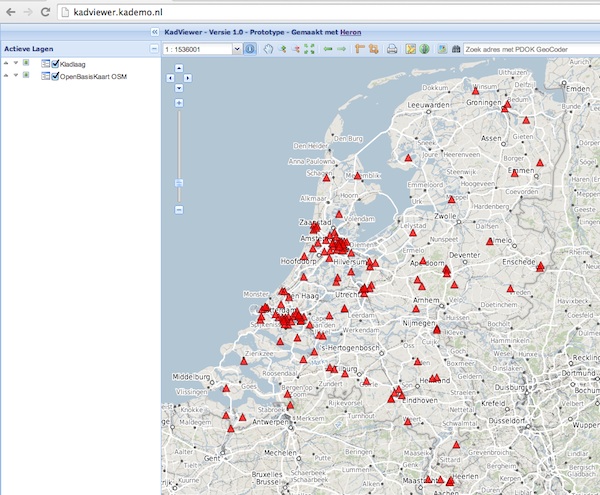
Figure - RIVM Eionet Stations uploaded/viewed in Heron-based Viewer
Reading into PostGIS
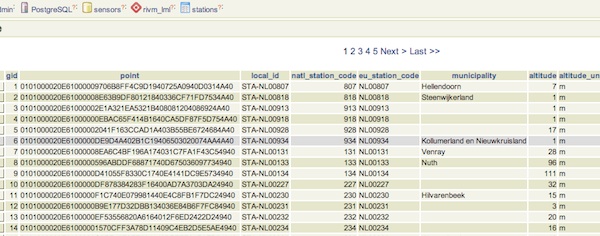
Figure - RIVM Eionet Stations Read into Postgres/PostGIS
Note that not all stations may be active. This is indicated by the activity_end column. We create a VIEW with
only active stations to be used for SOS Sensors (see below).
-- create a view with active stations
DROP VIEW IF EXISTS rivm_lml.active_stations CASCADE;
CREATE VIEW rivm_lml.active_stations AS
   SELECT * FROM rivm_lml.stations WHERE activity_end is NULL;
2.2.2.2. Measurements
Reading raw measurements from the files stored in the lml_files table is done with a Stetl
process. A specific Stetl Input module was developed to effect reading and parsing the files
and tracking the last id of the file processed.
https://github.com/Geonovum/sospilot/blob/master/src/rivm-lml/lmlfiledbinput.py
The Stetl process is defined in https://github.com/Geonovum/sospilot/blob/master/src/rivm-lml/files2measurements.cfg
The invokation of that Stetl process is via shell script: https://github.com/Geonovum/sospilot/blob/master/src/rivm-lml/files2measurements.sh
The data is stored in the measurements table, as below. station_id is a foreign key
into the stations table.
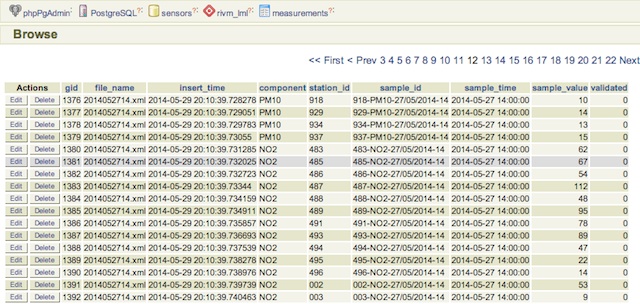
Figure - LML raw measurements stored in Postgres
Tracking ETL progress for the worker files2measurements is done in the etl_progress table.
The last_id field is the identifier of the last record in the lml_files table
processed. On each new run the ETL process starts from new records since that last record.
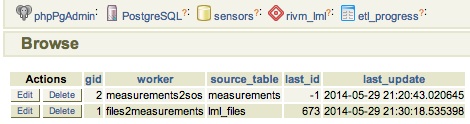
Figure - LML ETL Progress Tracked in Postgres
Some query examples:
-- Laatste 24 uur aan metingen voor station en component
SELECT  * FROM  rivm_lml.measurements
   WHERE sample_time >  current_timestamp::timestamp without time zone - '1 day'::INTERVAL
      AND component = 'NO' AND station_id = '136' order by sample_time desc;

-- Laatste meting voor station en component
 SELECT  * FROM  rivm_lml.measurements
   WHERE sample_time >  current_timestamp::timestamp without time zone - '1 day'::INTERVAL
      AND component = 'NO' AND station_id = '136' order by sample_time desc limit 1;
2.2.3. ETL Step 3 - SOS Publication
In this step the Raw Measurements data (see Step 2) is transformed to “SOS Ready Data”, i.e. data that can be handled by the 52North SOS server. Three options:
- direct transform into the SOS database of the 52N SOS server
- via “SOS Transactions” i.e. publishing via SOS-protocol (ala WFS-T)
- via REST
Discussion:
- Direct publication into the SOS DB (39 tables!) seems to be cumbersome and error prone and not future-proof
- via “SOS Transactions” (SOS-T) seems a good and standard option
- Using the REST-API seems the quickest/most efficient way to go, but the status of the REST implementation is unsure.
So from here on publication via SOS-T is further expanded.
2.2.3.1. SOS Transaction - PoC
A small Proof-of-Concept using the available requests and sensor ML as example was quite promising. This also provides an example for the mapping strategy.
We have created JSON insert-sensor and insert-observation requests and executed these
in the Admin SOS webclient. Each Sensor denotes a single station with Input just “Air” and one
Output for each chemical Component (here O3, MO, NO2, PM10). These files can serve later as templates
for the ETL via Stetl. The insert-sensor needs to be done once per Station before invoking any InsertObservation.
The insert-observation is performed per measurement, though we may consider using an
insert-result-template and then insert-result or SOS-Batch operations for efficiency.
See the images below.
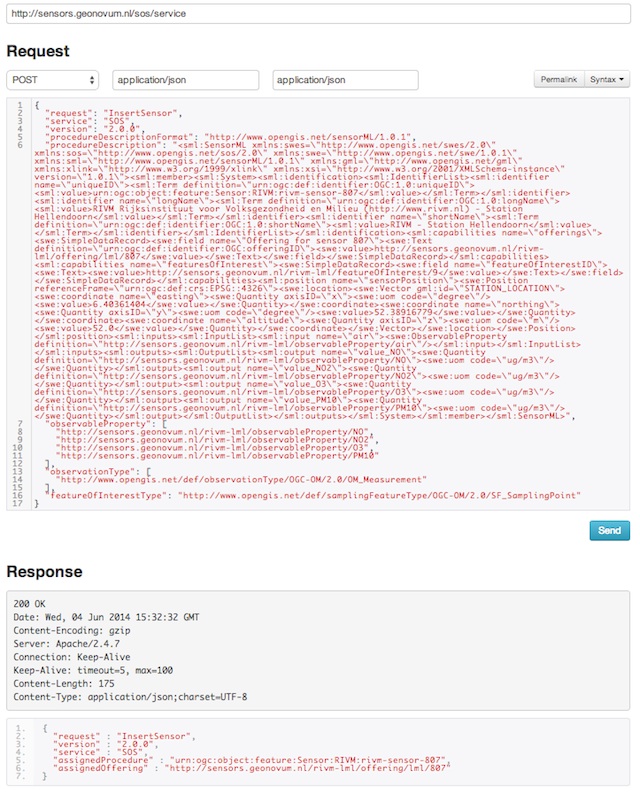
Figure - Inserting a Station as sensor definition using SOS via 52N SOS Admin webclient
And the observation insert below.
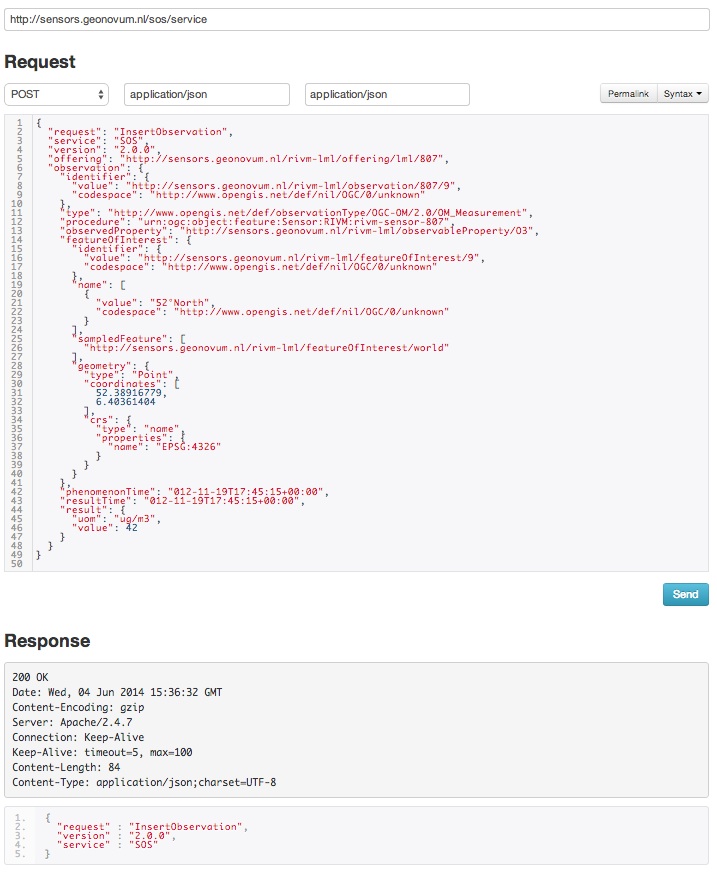
Figure - Inserting a single measured value (O3) as an Observation as using SOS via 52N SOS Admin webclient
2.2.3.2. SOS Publication - Stetl Strategy
As Stetl only supports WFS-T, not yet SOS, a SOS Output module sosoutput.py was developed derived
from the standard httpoutput.py module. See https://github.com/Geonovum/sospilot/blob/master/src/rivm-lml/sosoutput.py.
Most importantly, the raw RIVM-LML data
from Step 2 needs to be transformed to OWS O&M data. The easiest is to use substitutable templates, like the
Stetl config itself also applies. This means we develop files with SOS Requests in which all variable parts get a
symbolic value like {sample_value}. These templates can be found under
https://github.com/Geonovum/sospilot/tree/master/src/rivm-lml/sostemplates in particular
- https://github.com/Geonovum/sospilot/blob/master/src/rivm-lml/sostemplates/insert-sensor.json InsertSensor
- https://github.com/Geonovum/sospilot/blob/master/src/rivm-lml/sostemplates/procedure-desc.xml Sensor ML
- https://github.com/Geonovum/sospilot/blob/master/src/rivm-lml/sostemplates/insert-observation.json InsertObservation
These templates were derived from the sample SOS requests available in the 52N SOS Admin Client. Note that we use JSON for the requests, as this is simpler than XML. The Sensor ML is embedded in the insert-sensor JSON request.
2.2.3.3. SOS Publication - Sensors
This step needs to be performed only once, or when any of the original Station data (CSV) changes.
The Stetl config https://github.com/Geonovum/sospilot/blob/master/src/rivm-lml/stations2sensors.cfg
uses a Standard Stetl module, inputs.dbinput.PostgresDbInput for obtaining Record data from a Postgres database.
{{
  "request": "InsertSensor",
  "service": "SOS",
  "version": "2.0.0",
  "procedureDescriptionFormat": "http://www.opengis.net/sensorML/1.0.1",
  "procedureDescription": "{procedure-desc.xml}",
   "observableProperty": [
    "http://sensors.geonovum.nl/rivm-lml/observableProperty/benzeen",
    "http://sensors.geonovum.nl/rivm-lml/observableProperty/CO",
    "http://sensors.geonovum.nl/rivm-lml/observableProperty/NH3",
    "http://sensors.geonovum.nl/rivm-lml/observableProperty/NO",
    "http://sensors.geonovum.nl/rivm-lml/observableProperty/NO2",
    "http://sensors.geonovum.nl/rivm-lml/observableProperty/O3",
    "http://sensors.geonovum.nl/rivm-lml/observableProperty/PM10",
    "http://sensors.geonovum.nl/rivm-lml/observableProperty/PM25",
    "http://sensors.geonovum.nl/rivm-lml/observableProperty/SO2"
  ],
  "observationType": [
    "http://www.opengis.net/def/observationType/OGC-OM/2.0/OM_Measurement"
  ],
  "featureOfInterestType": "http://www.opengis.net/def/samplingFeatureType/OGC-OM/2.0/SF_SamplingPoint"
}}
The SOSTOutput module will expand {procedure-desc.xml} with the Sensor ML template.
2.2.3.4. SOS Publication - Observations
The Stetl config https://github.com/Geonovum/sospilot/blob/master/src/rivm-lml/measurements2sos.cfg
uses an extended Stetl module (inputs.dbinput.PostgresDbInput) for obtaining Record data from a Postgres database:
https://github.com/Geonovum/sospilot/blob/master/src/rivm-lml/measurementsdbinput.py.
This is required to track progress in the etl_progress table similar as in Step 2.
The last_id is remembered.
The Observation template looks as follows.
{{
   "request": "InsertObservation",
   "service": "SOS",
   "version": "2.0.0",
   "offering": "http://sensors.geonovum.nl/rivm-lml/offering/{station_id}",
   "observation": {{
     "identifier": {{
       "value": "{unique_id}",
       "codespace": "http://www.opengis.net/def/nil/OGC/0/unknown"
     }},
     "type": "http://www.opengis.net/def/observationType/OGC-OM/2.0/OM_Measurement",
     "procedure": "http://sensors.geonovum.nl/rivm-lml/procedure/{station_id}",
     "observedProperty": "http://sensors.geonovum.nl/rivm-lml/observableProperty/{component}",
     "featureOfInterest": {{
       "identifier": {{
         "value": "http://sensors.geonovum.nl/rivm-lml/featureOfInterest/{station_id}",
         "codespace": "http://www.opengis.net/def/nil/OGC/0/unknown"
       }},
       "name": [
         {{
           "value": "{municipality}",
           "codespace": "http://www.opengis.net/def/nil/OGC/0/unknown"
         }}
       ],
       "geometry": {{
         "type": "Point",
         "coordinates": [
           {station_lat},
           {station_lon}
         ],
         "crs": {{
           "type": "name",
           "properties": {{
             "name": "EPSG:4326"
           }}
         }}
       }}
     }},
     "phenomenonTime": "{sample_time}",
     "resultTime": "{sample_time}",
     "result": {{
       "uom": "ug/m3",
       "value": {sample_value}
     }}
   }}
}}
It is quite trivial in sosoutput.py to substitute these values from the measurements-table records.
Like in ETL Step 2 the progress is remembered in the table rivm_lml.etl_progress by updating the last_id field
after publication, where that value represents the gid value of rivm_lml.measurements.
2.2.3.5. SOS Publication - Results
We can observe the database being filled:
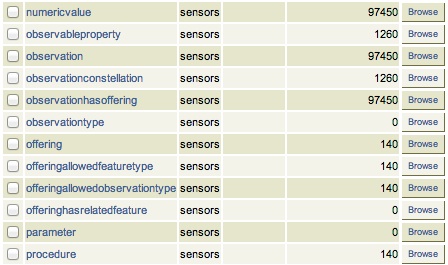
Figure - SOS server database being filled: 140 Sensors (Stations) about 100000 Observations inserted
Via the standard SOS protocol the results can be tested:
- GetCapabilities: http://sensors.geonovum.nl/sos/service?service=SOS&request=GetCapabilities
- DescribeSensor (station 807, Hellendoorn): http://tinyurl.com/mmsr9hl (URL shortened)
- GetObservation: http://tinyurl.com/ol82sxv (URL shortened)
2.2.3.6. REST API
For now the REST API will not be used since SOS-T is used (see above). Below is for possible future reference.
Documentation REST API: http://52north.org/files/sensorweb/docs/sos/restful/restful_sos_documentation.pdf
REST root URL: http://sensors.geonovum.nl/sos/service/rest
From the documentation the mapping seems to make sense as follows:
sensor-create- to create new sensor resources –> map fromstationstableobservation-create- to create observation resources –> map frommeasurementstable
Design:
- use Stetl: input Postgres Query, output SOS-REST module
- similar to ETL step 2
- track progress in
etl_progresstable - new Stetl output, similar to WFS-T and deegree-publisher
- use Python XML templates for the requests
- problem: make SML, Sensor per Station, or Sensor per Station-Component ?